


Price Max on Dhan




One of the biggest roadblocks traders face is that of agility. Every trader should be able to enter a trade as quickly as possible, without having to manually calculate everything.
Every single step between analysis to execution can become a hassle if there are too many steps in between, and minor delays can cause frustration and occasionally result in lost trading opportunities or price slippage as markets move. We’ve introduced Price Max to solve this problem.
What is Price Max?
As we spoke to thousands of traders, we realized that most tend to determine the maximum quantity of an order manually. They had to verify their available margin, which is the amount of money left over after any open trades and prior commitments, and then decide the actual order quantity.
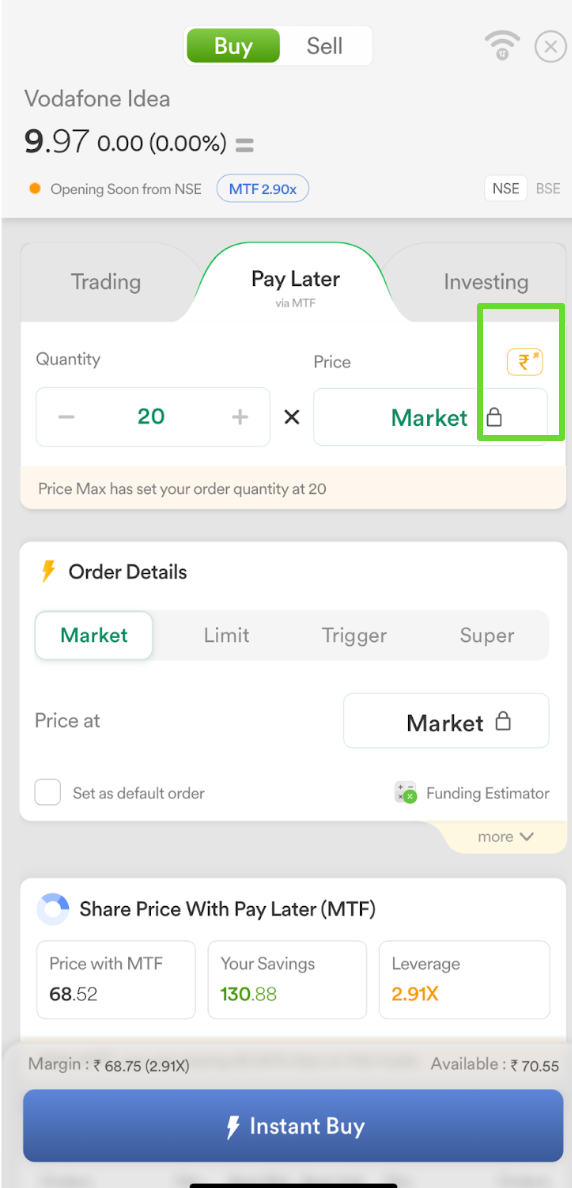
Price Max enables users to automatically enter the maximum quantities or lots they can purchase or sell based on their available margin. This is possible with just a single tap, and you simply need to tap on the “₹” icon or the briefcase icon on Web.
Based on your margin for that order type and instrument, Dhan will immediately compute your available funds and fill in the maximum quantity or lots. As you can tell, Price Max on Dhan has made the process instantaneous and automated.
Below is the screenshot form Dhan app highlighting the price max feature:
How to Use Price Max
You can find Price Max on Dhan App and Dhan Web. As you get ready to place an order, take these easy steps:
- Select a Stock, Futures, Options, or Commodity
- Conduct your analysis and decide on the appropriate scrip
- Open the order window
- Locate the “₹” symbol on the top right corner or briefcase icon next to Qty on Web
The Price Max feature on web is highlighted in the screenshot below:
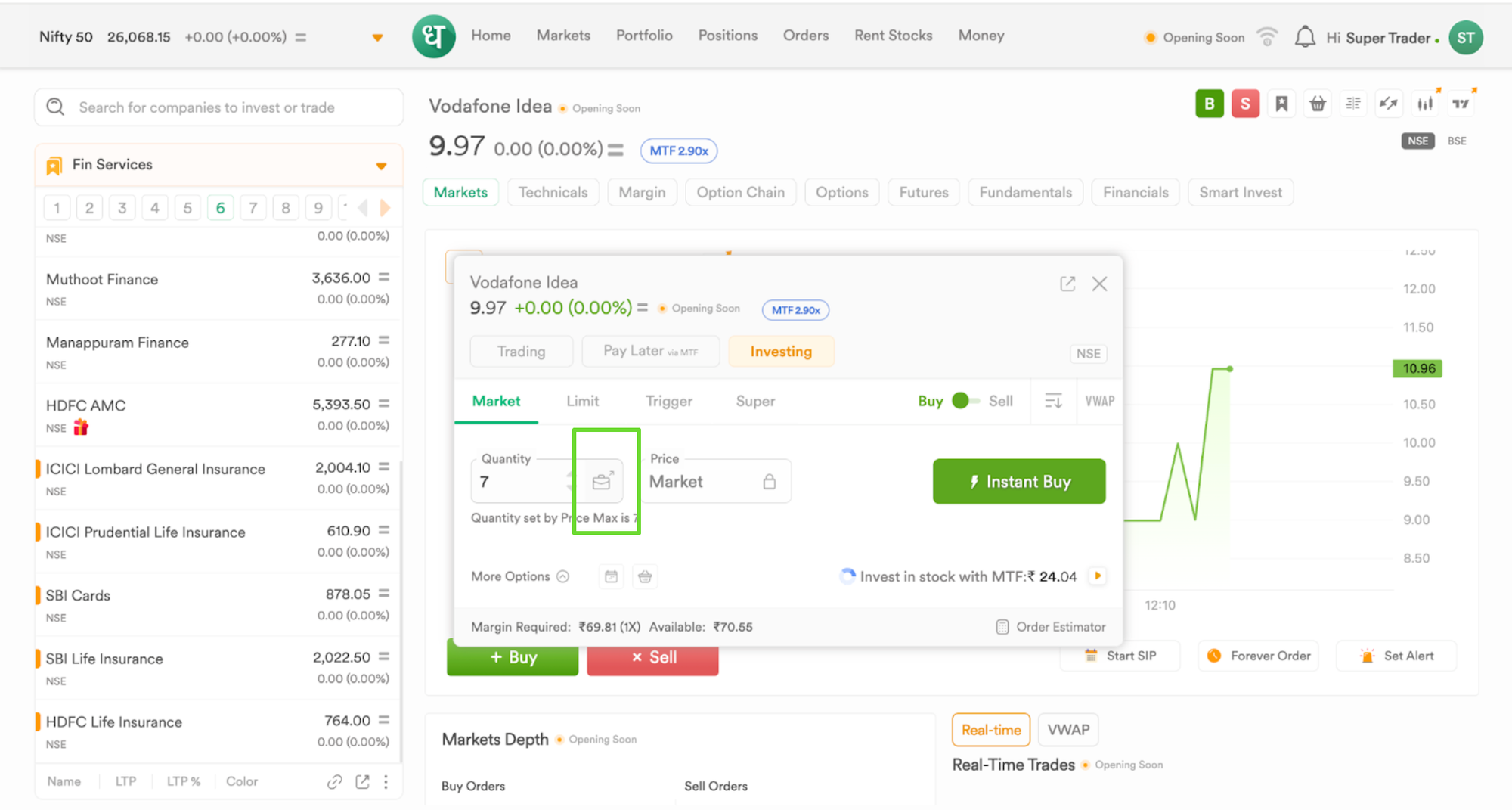
That’s it! Dhan instantly determines the amount of money available for trading so that you can make the most of your capital by completing the order confirmation process without going over your available funds or receiving a rejection from the exchange because of an inadequate balance.
Advantages of Price Max
- Speed: Let the system do your calculations instead of using calculator apps or mental math.
- Confidence: No more "insufficient margin" mistakes or concerns about inadvertently entering the incorrect amount.
- Accuracy: You receive real-time calculations each time you open the order window because Dhan's backend continuously updates your margins and available funds based on all of your account activity.
- Convenience: Price Max is integrated into your trading workflow, so you don't have to exit the app or switch tabs to calculate numbers.
- Risk management: You can swiftly decide to scale back and control your exposure if necessary by seeing the absolute maximum you can place. Simply put, the feature keeps you in control by letting you see the upper limit.
- Multiple segments: Price Max carries out the same fast computation, adjusting to margin regulations for each segment, whether you are trading stocks, options, or commodities.
Features You Can Use with Price Max
While Price Max allows you to enter positions quickly, you can combine it with other features for risk management:
- Trailing Stop Loss: Once you place an order with Price Max, you can add a Trailing Stop Loss to ensure that you limit a trade’s downside and protect your upside
- Super Orders: Being an all-in-one Order, Super Orders allow you to set Entry, Target, and Stop Loss together, and you can use Price Max in conjunction
- Trade Plan: A position sizing feature on charts that allows you to determine a trade’s value based on your allocation and risk
FAQs
What is Price Max?
Price Max saves time and minimizes errors by automatically filling the maximum quantity or lots for an order based on your available margin in a single click.
Where is the Price Max feature located?
A ₹ icon will appear in the Dhan app's order window in the top right corner or look for a briefcase icon next to Qty if you are using Dhan web.
For which market segments is Price Max applicable?
It is applicable to Equity, Derivatives, and Commodity segments.
Can I change the recommended amount?
Yes, if you'd like, you can still manually change the quantity after using Price Max.
Will Price Max stop trades from being rejected because there isn't enough margin?
In order to minimize such errors, it is built to automatically determine your available quantity up to the maximum allowed.
Does the feature adapt to real-time price changes?
Price Max provides real-time calculations based on account movements, margin updates, and current prices.
Is it accessible only through the Dhan app?
You can access Price Max from Dhan App and Dhan Web, and on both platforms, it is available on the Order Window.
Is it helpful for both novice and seasoned traders?
Yes, it is intended for anyone who appreciates simplicity, speed, or the avoidance of margin errors.