



Invest Your Way with SIP Custom Time + MTF on Dhan






Key takeaways
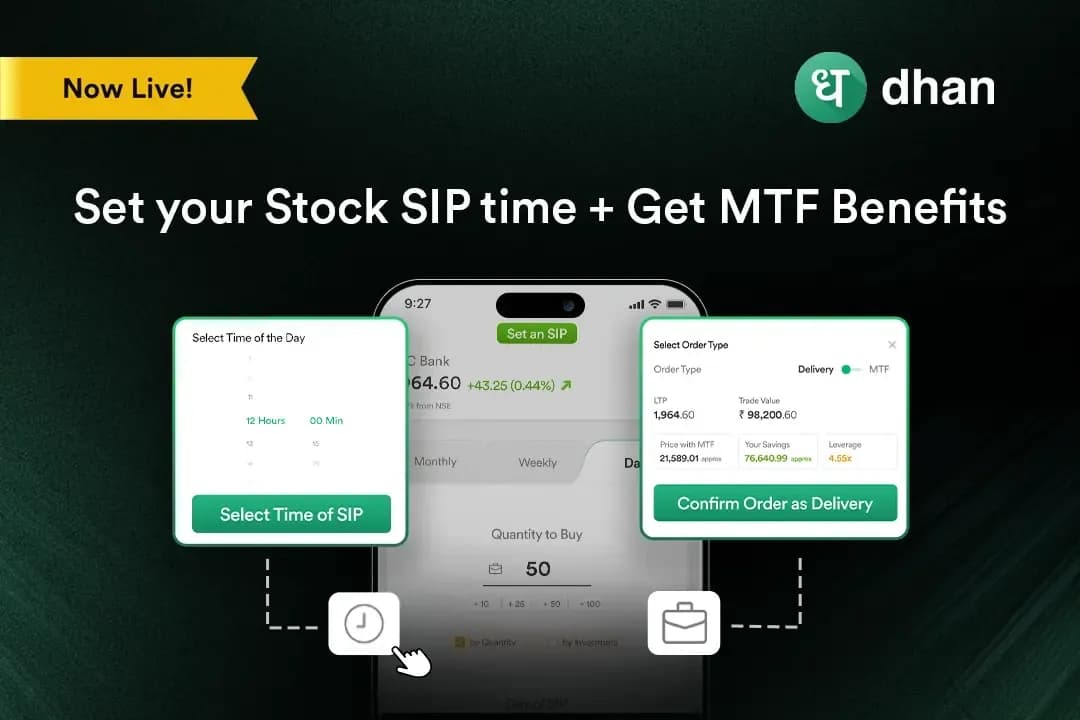
- SIP Custom Time allows investors to schedule Stock and ETF SIP executions at any 15-minute interval between 9:30 AM and 3:00 PM instead of relying only on the default execution time.
- For MTF-eligible stocks, SIP installments can be funded using the Margin Trading Facility, offering greater capital flexibility without changing the recurring SIP structure.
Stock and ETF SIPs are built for consistency, but execution preferences can vary from one investor to another.
Some investors may prefer not to place orders immediately at market open, when price movement can be relatively sharp. Some may also want to continue systematic investing while keeping some capital available for other positions. A fixed SIP execution setup does not account for these preferences.
That is why we have built SIP Custom Time + MTF, which allows you to set the execution time during market hours and use MTF for SIP.
What is SIP Custom Time + MTF?
SIP Custom Time + MTF allows investors to choose when their Stock or ETF SIP executes during market hours and, where eligible, use Margin Trading Facility (MTF) for SIP funding.
Instead of all SIPs executing at a fixed time, investors can select a preferred execution window between 9:30 AM and 3:00 PM, in 15-minute intervals.
For eligible stocks, SIP instalments can also be executed using MTF instead of requiring the full upfront amount. If no time is selected, the SIP continues to execute at the default 9:30 AM.
This combines execution timing flexibility with funding flexibility in the same SIP workflow. For example, the market is usually volatile during initial sessions after opening. With this feature, you can set the time to 11:30 AM or any preferred time of your choice within the market hours to avoid volatility. Also, you can enable the MTF feature, so each instalment uses a margin, which lets you increase your positions while keeping the cash available for other trades.
Why SIP Custom Time + MTF feature matters
Here is why this feature matters
More control over SIP execution timing
Not every investor wants SIP execution at the same time each day. With custom scheduling, SIPs can be aligned with a preferred market window instead of relying only on the default timing.
For example, an investor who prefers to avoid the initial market session can schedule execution later in the day.
Margin funding for eligible SIPs
SIPs are usually associated with disciplined and periodic investing. This feature retains that structure, but lets investors pick their own timing of execution and, where relevant, method of funding.
The result is a SIP process that remains systematic while accommodating different portfolio preferences.
How SIP Custom Time + MTF works
Follow the steps below to set up SIP custom time and use MTF.
- Log in to your account and select any stock or the ETF in which you want to invest.
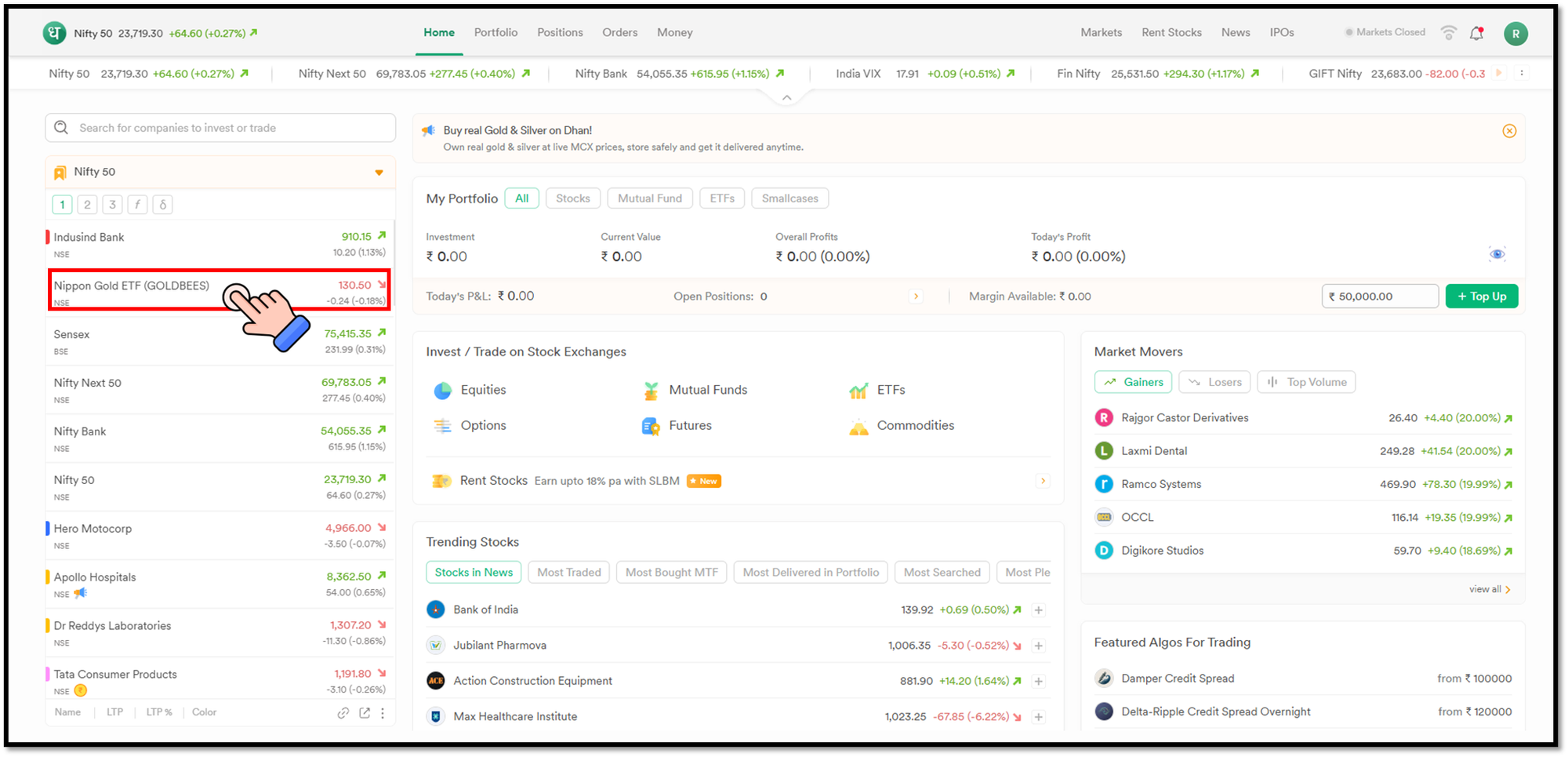
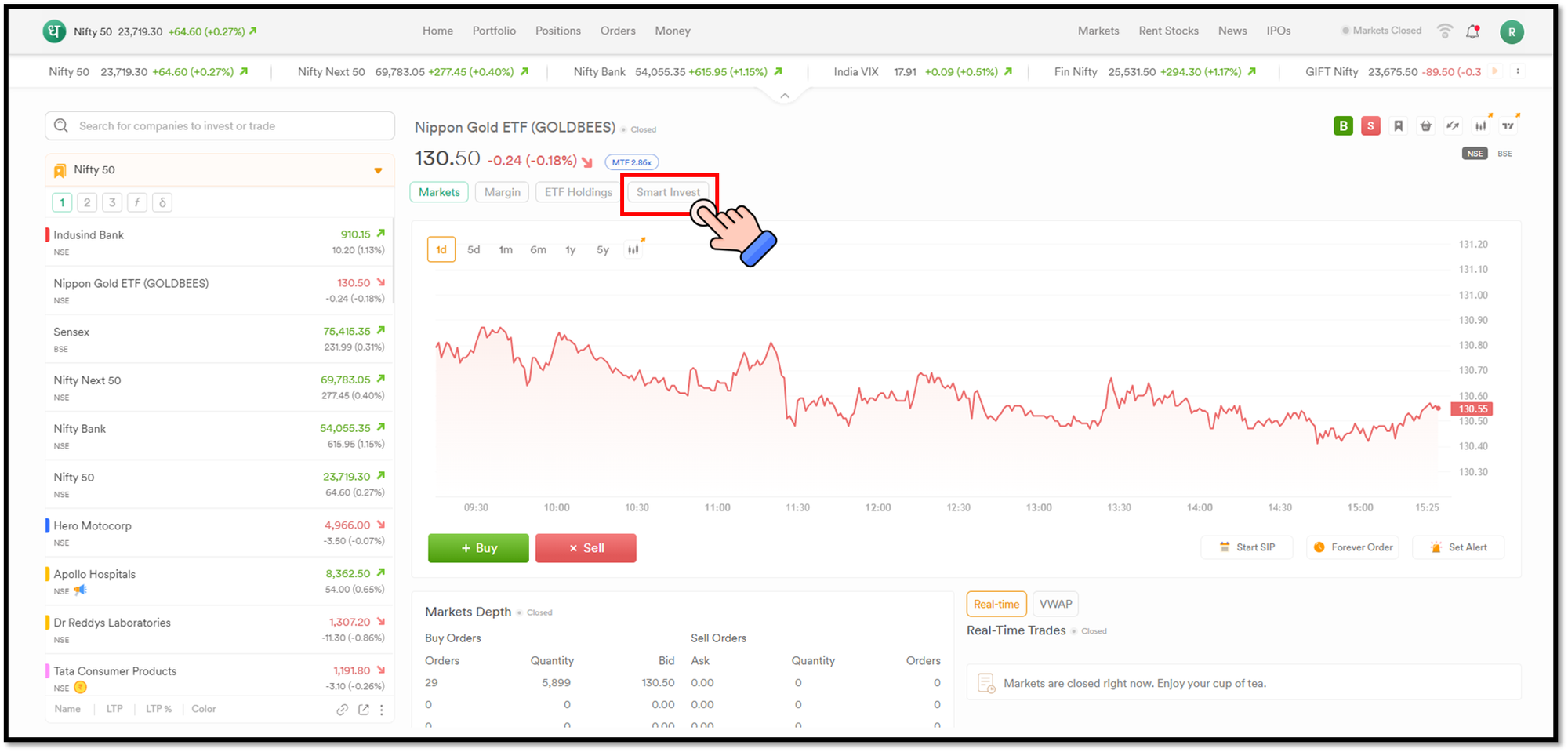
- Click on the ‘Smart Invest’ available just below the price. Refer to the figure below.
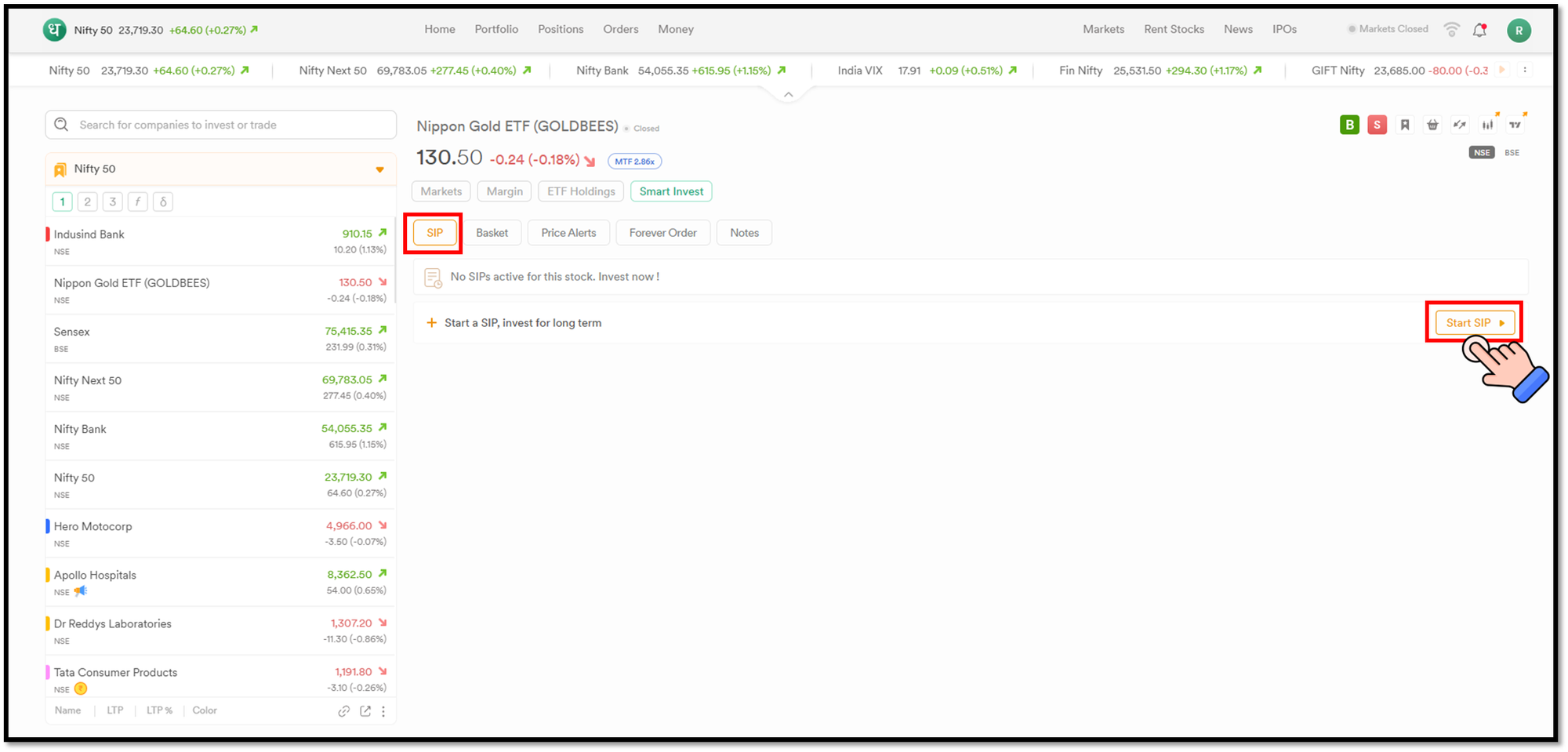
- Make sure that you are on the ‘SIP’ tab. Click on the ‘Start SIP’ button available on the right side. Refer to the figure below.
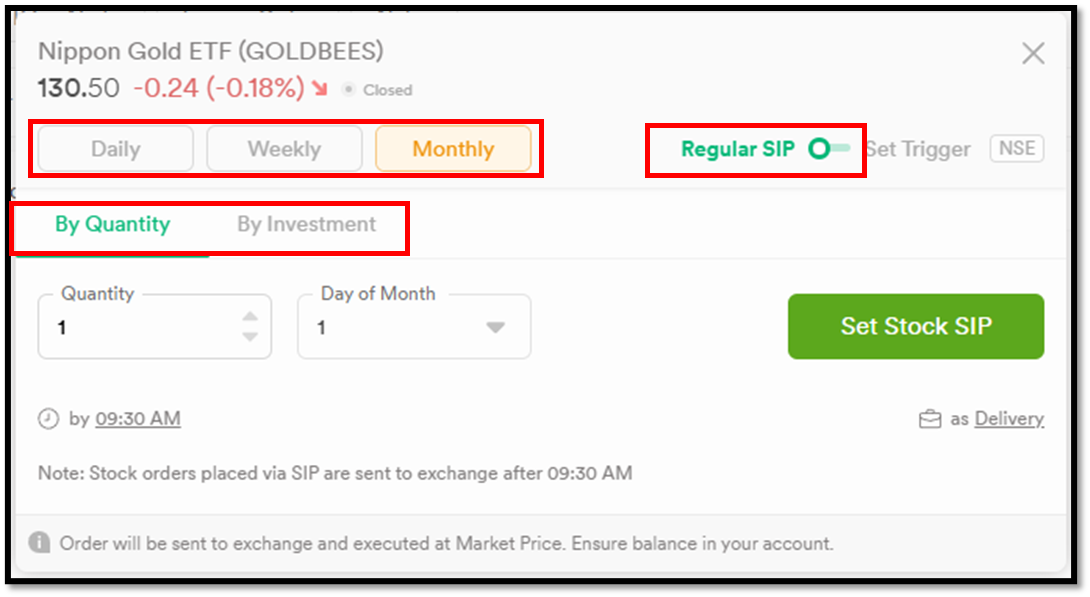
- A pop-up will appear. Choose the SIP period: Daily, Weekly, or Monthly. Choose the type of SIP as ‘regular SIP’. Select how you would like to invest, ‘By Quantity’ or ‘By amount’.
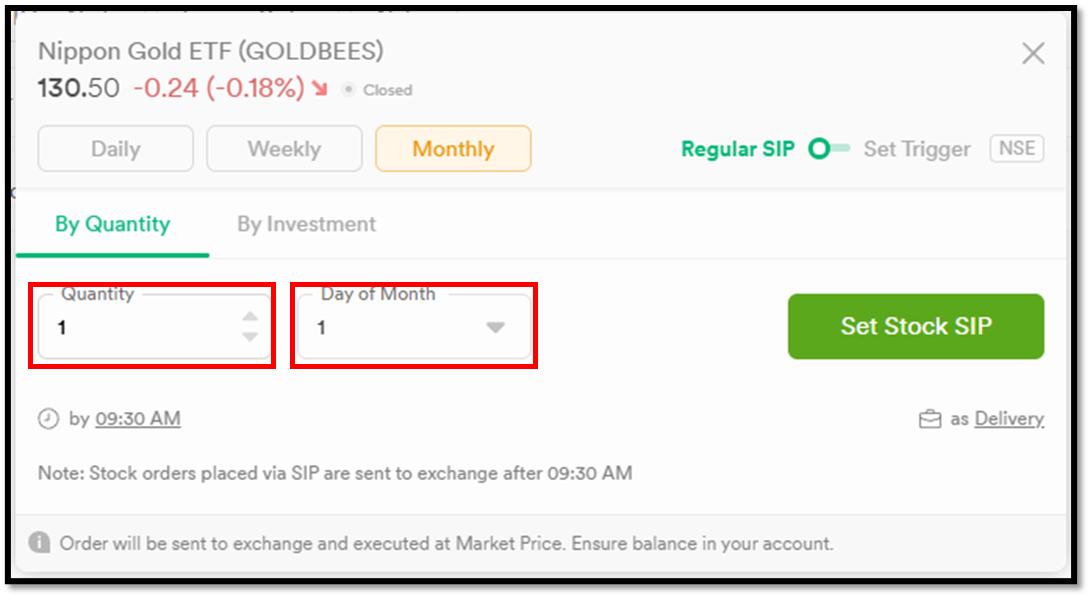
- Select the quantity and the date of the month at which you want to set the SIP.
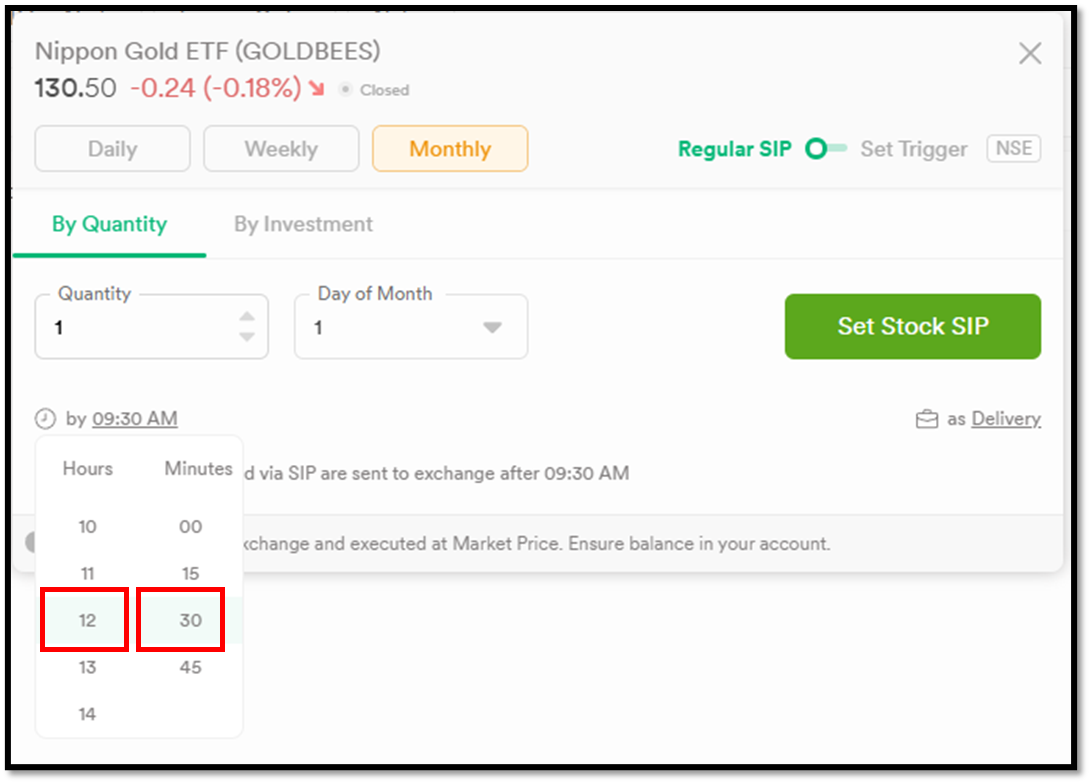
- Just below the ‘Quantity’, you will see the timing. Click on it and set the timing at which you want to execute the SIP order. For reference, we have selected 12 hrs 30 min. You can select a time between 9:30 AM and 3:00 PM in 15-minute intervals.
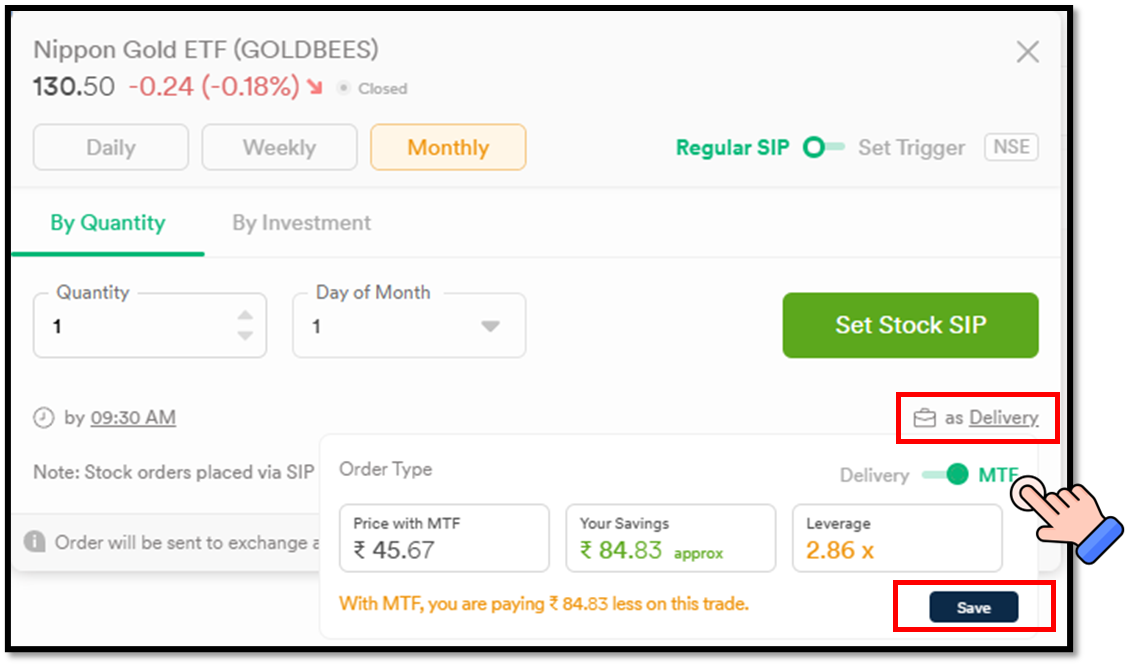
- To select the order type, click on the ‘As Delivery’ located on the right side of the timing. Refer to the figure below. Here you can toggle between the Delivery and MTF. You will be able to select the ‘MTF’ option only if the selected stock/ ETFs qualify for the Margin Trading Facility. Click on the ‘Save’ button to save your preferences.
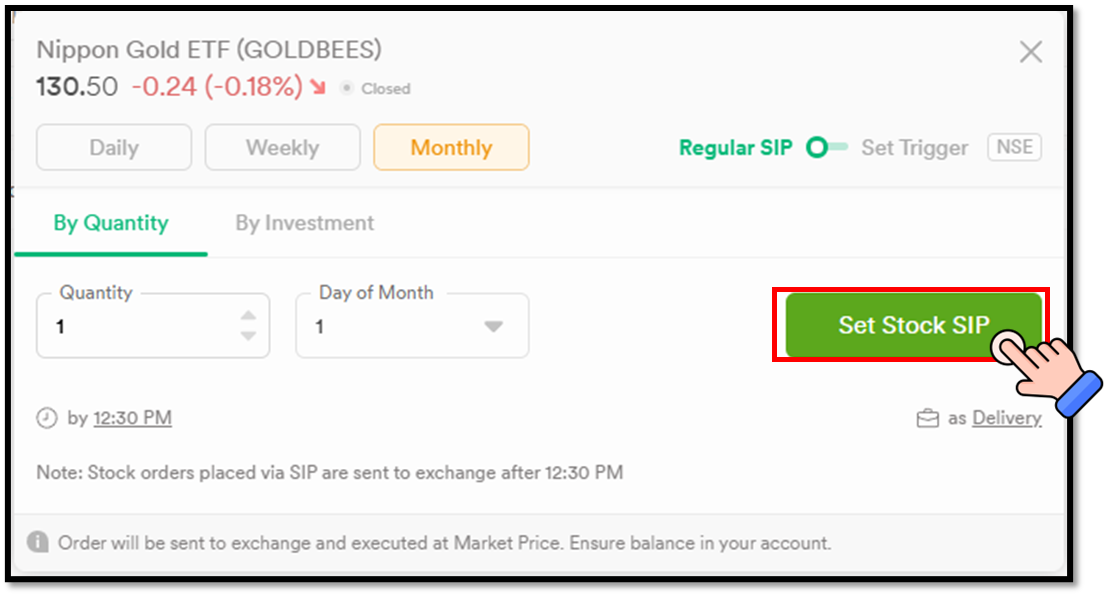
- Once done, click on the ‘Set Stock SIP’, and you will see a temporary pop-up ‘SIP on this Stock is Created’.
Key benefits of SIP custom time + MTF
The key benefits of the SIP custom time and MTF feature are listed below:
- The Custom SIP timing gives you greater control over execution.
- It gives you the flexibility to schedule your SIP during the market hours and with a 15-minute interval selection to avoid opening volatility.
- The feature offers margin-based SIP funding for eligible stocks. You can use those funds for other opportunities.
- The feature preserves the default behaviour if you don’t choose the execution time. It will automatically place your order at 9:30 AM.
Use cases
The practical use cases for SIP custom time + MTF are as follows:
Scheduling beyond market open
An investor may not like to place SIP orders early in the market. Instead of the default timing, they can set the SIP at 11:15 AM using the SIP custom time feature of Dhan. This keeps the SIP intact, and execution happens in their preferred window.
Managing capital flexibility
If you want to continue accumulating a stock through SIP while preserving available cash for other portfolio activity. You can enable the MTF during the SIP creation on the MTF-eligible stocks.
Building long-term positions with phased accumulation
Suppose you have a long-term view on a particular stock but prefer accumulating it gradually instead of making a lump sum purchase. With SIP on preferred execution time and using MTF on eligible stocks, you can accumulate the stock while managing capital allocation more flexibly.
Final thoughts
SIP Custom Time + MTF takes it one notch higher on how Stock and ETF SIPs can be executed. The feature allows you to choose execution timing and margin funding, through which you can avoid highly volatile market timings and preserve some cash for additional opportunities.
It addresses two practical constraints of fixed execution timing and full upfront funding requirements for recurring investments. The feature is suitable for investors who want more control over SIP execution while effectively using the capital.