



Group Stocks & Organise your Watchlist with Sections on Dhan






Key takeaways:
- Sections allow users to group stocks within a single watchlist by sector, theme, or strategy.
- Stocks can be moved between sections using drag and drop, while sections and stocks within them can be reordered.
- Users can create up to 20 sections in one watchlist and rename them whenever required.
As a watchlist grows, keeping stocks from different sectors, themes, and strategies together can make the list harder to navigate. Dhan watchlists can hold up to 250 stocks, and the earlier way to separate different categories was to create multiple watchlists. That could fragment the stocks being tracked across different tabs. Our Sections in Watchlist address this by allowing stocks to be organised into named groups within the same watchlist.
What are Sections in Watchlist?
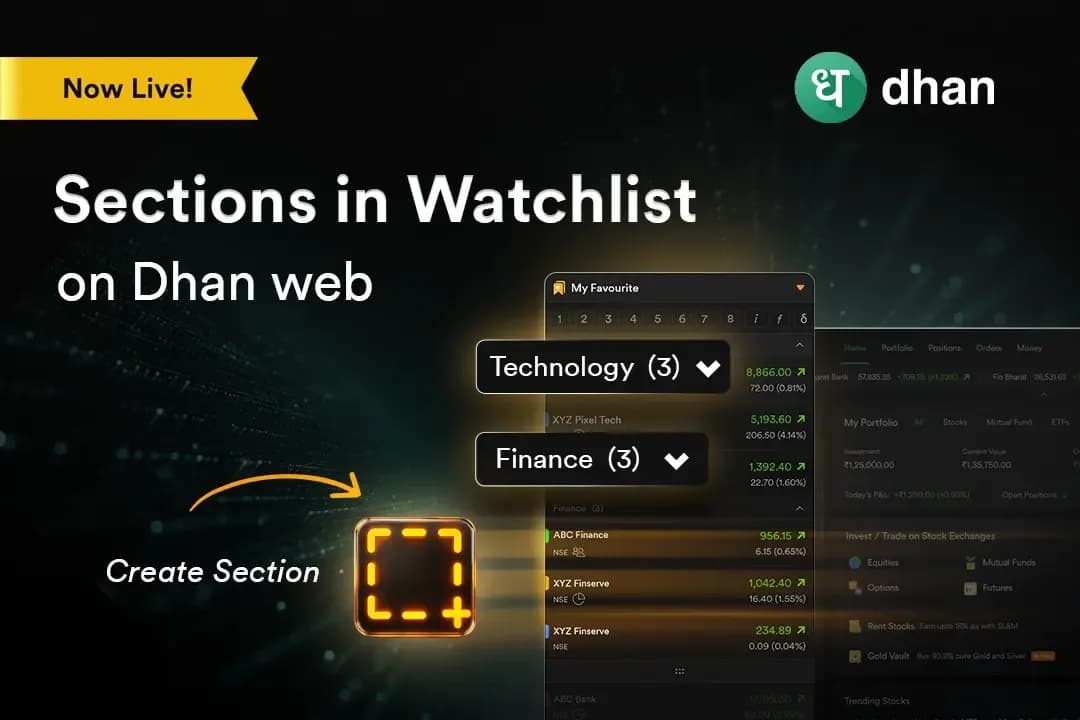
Our Sections in Watchlist is a watchlist organisation feature that allows users to create named sections inside a single watchlist. Stocks can then be grouped according to sectors, themes, strategies, or any other categories the user chooses.
Users can move stocks into, out of, and between sections using drag and drop. They can also reorder both the sections and the stocks within them. Up to 20 sections can be created in a single watchlist, and section names can be changed at any time.
Why this feature matters?
When different types of stocks need to be tracked together, grouping them within one watchlist changes how that list can be organised.
Group stocks by sector, theme, or strategy
Each section can have a name and can be used to group stocks according to a particular sector, theme, or strategy. This lets different categories remain within the same watchlist instead of requiring separate watchlists.
Efficient workflow
Traditional workflows rely on multiple separate watchlists or manual scrolling to find related names. Sections let you keep everything in one place while still organising by purpose.
Keeps you aligned with your strategy
As your focus shifts throughout the trading session from pre-market prep to intraday execution to end-of-day review, sections let you switch contexts quickly. You open the relevant section, see the right set of stocks, and act without distraction.
How Sections in Watchlist works?
To use the sections in watchlist feature on Dhan, follow the procedure below:
- Open any watchlist and select Create Section from the watchlist footer.
- Give the section a name based on how you want to group the stocks.
- Add stocks to the section using drag and drop, or select Add to Section from the stock menu.
- Continue organising the watchlist by moving stocks between sections or reordering sections and stocks. Any new stocks added to the watchlist appear in the unsectioned list.
The feature is currently live on Dhan Web and TradingView. Sections created on the web do not currently reflect on the Dhan App.
Advantages of Sections in Watchlist
The key advantages of making sections in Watchlist are as follows:
- Stocks from different sectors, themes, or strategies can be grouped inside one watchlist rather than being separated across multiple watchlists.
- Stocks can be moved into, out of, or between sections using drag and drop, so their grouping can be changed as required.
- Users can change the order of sections as well as the stocks within them.
- A single watchlist can contain up to 20 named sections, allowing multiple categories to be maintained within that watchlist.
Use cases of Sections in Watchlist
Use cases of Sections in Watchlist are as follows:
Sector-based tracking
You track banking and IT themes separately. Creating banking and IT sections lets you review each theme in isolation, compare names within the sector, and spot relative strength without distraction from unrelated stocks.
Theme-based tracking
Different market themes can have their own sections, allowing the stocks associated with each theme to remain grouped within the same watchlist.
Strategy-based tracking
You hold long-term positions and swing trade ideas in the same watchlist. Sections like long-term and Swing keep each strategy distinct, helping you allocate attention appropriately and avoid mixing timeframes.
Conclusion
Our Sections in Watchlist allow multiple named groups to exist within one list. The feature addresses the earlier need to create separate watchlists when stocks belonged to different sectors, themes, or strategies.
With up to 20 sections, drag-and-drop movement, and the ability to reorder sections and stocks, users can organise these categories within a single watchlist rather than splitting them across multiple watchlist tabs.