


Find Right Opportunities at the Right Time with Intraday Timeframes on ScanX





The problem that most intraday traders face today is not only finding attractive opportunities, but finding them at the right time. What appears to be a strong setup on a daily chart might be over-extended on a 5-minute chart. When it shows up in a daily scan, the move is usually partially played out. This lag time between identification and execution is where many intraday strategies fall short.
Key takeaways:
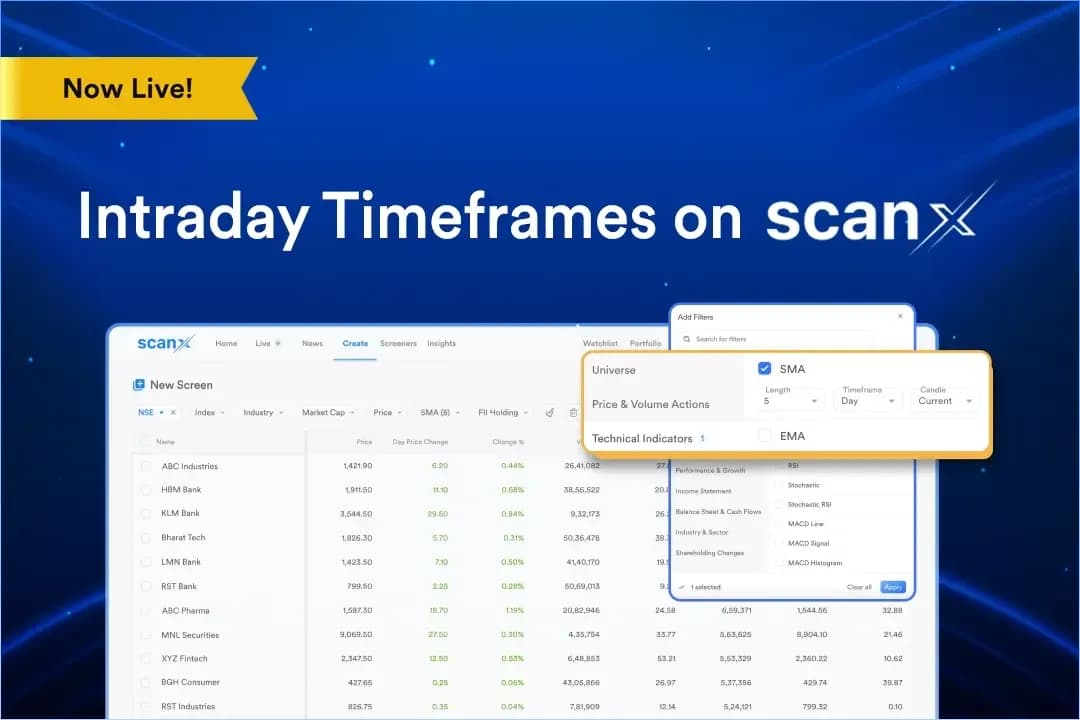
- Intraday Timeframes on ScanX offer 5-minute and 15-minute time frame support for all technical indicators in the ScanX Screener.
- The update is available in addition to the daily time frame, allowing traders to use both time frames on the ScanX.
- It assists you in identifying evolving setups, potential trend reversals, and momentum shifts in real time.
- It allows you to evaluate both the current candle and the previous candle data.
What are Intraday Timeframes on ScanX?
Intraday Timeframes on ScanX is a screening feature that introduces 5-minute and 15-minute timeframes support across all technical indicators available within the ScanX Screener.
This feature is introduced because different trading styles have different requirements. If you are an intraday trader, then you need faster signals, a short time frame, and a way to keep track of changing market structure without having to wait for the end of the day.
With this feature, you can identify evolving setups, momentum, and trends in real-time. It also offers the choice to filter on the basis of the current or the previous candle, and then compare both to find trends that change with each candle.
Why Intraday Timeframes on ScanX matter?
The common pain point among most intraday traders is that while daily timeframes work well for swing and positional strategies, they do not provide the faster signals needed for intraday trading. A 15-minute delay can easily result in a missed entry. Intraday Timeframes features solve this execution gap in your screening process.
Captures faster signals
This feature lets you identify the new trends and momentum reversals in real-time, rather than waiting for the longer timeframes screener to capture the trend, which sometimes catches the trend after the market has already moved on. Thus, with Intraday Timeframes, you receive actionable data in real-time showing when the market is moving.
Dynamic filtering
The market structure is dynamic and sometimes evolves rapidly during a single session. This feature enables you to adjust in real time, by filtering for specific technical conditions on granular timeframes, and easily identify trend continuation or shifts in market participation across stocks and indices.
Keeps you in control
You decide how aggressive or conservative your scans should be. By allowing you to choose whether your filters evaluate the current forming candle or the previous closed candle, you can ensure that the screener adheres to your personal risk parameters.
How do Intraday Timeframes on ScanX work?
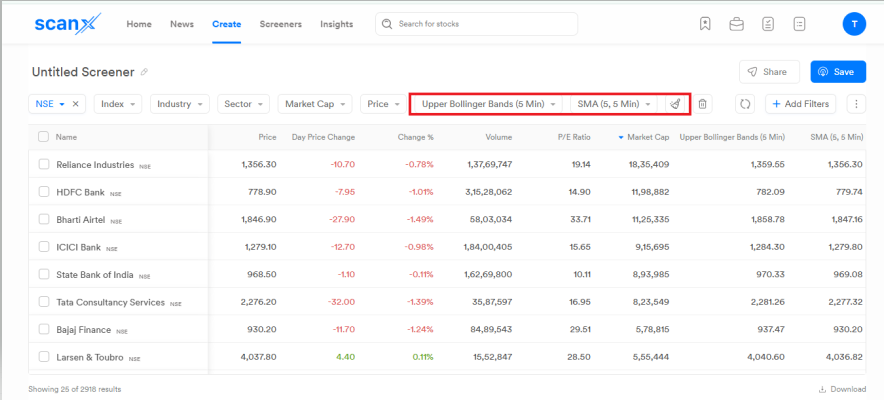
Setting up Intraday Timeframes on ScanX is a simple process, and it involves the following steps:
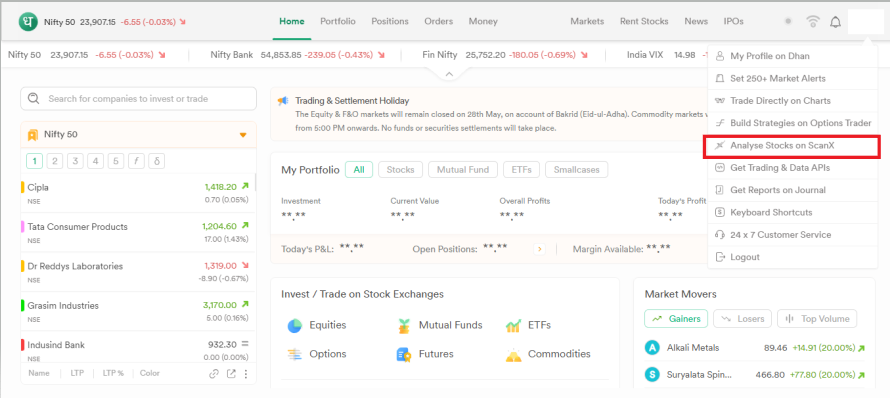
Step 1: Log in to the Dhan app or web platform and go to the Analyse Stocks on ScanX.
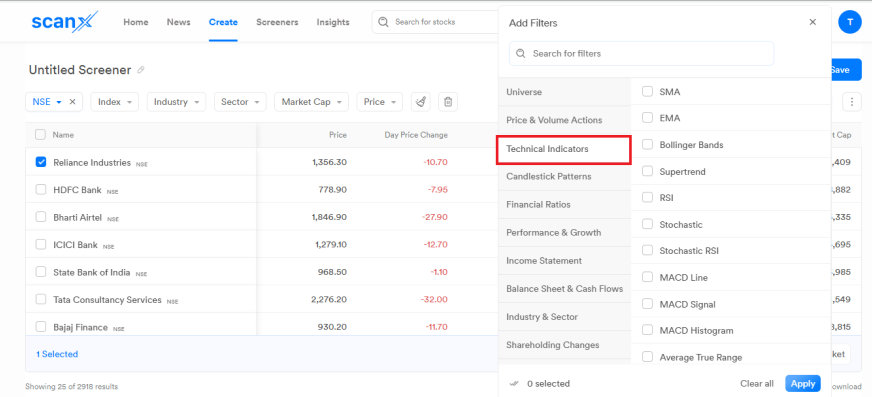
Step 2: Within the ScanX Screener, you can apply your desired technical indicators.
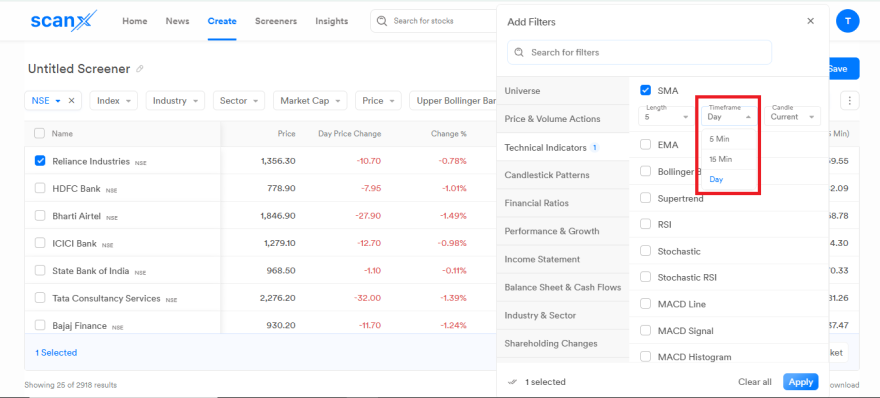
Step 3: Select the time frame you prefer: 5 minutes, 15 minutes, or Daily.
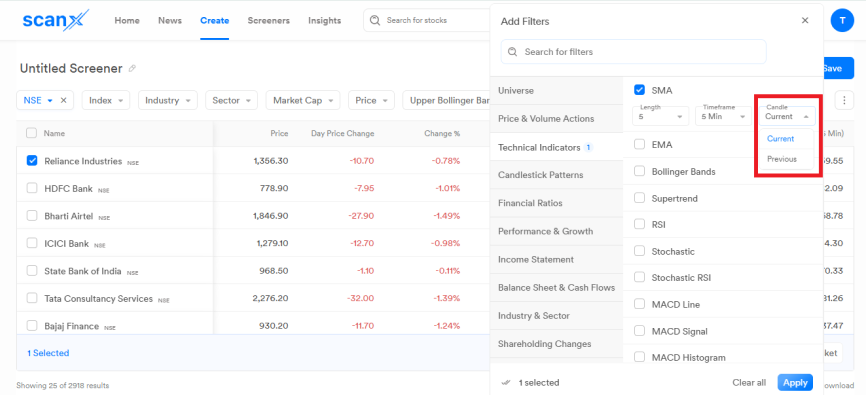
Step 4: Set your filter parameters by choosing whether they should apply to the current candle or the previous candle.
Step 5: Run the scan, and you can monitor the list of stocks matching your precise criteria.
Key benefits of Intraday Timeframes on ScanX
Intraday Timeframes offer you several benefits. Some of those are:
- Multiple timeframe-matched signals: It allows you to scan the market across multiple timeframes, like 5-minute, 15-minute, or daily timeframes.
- Current vs previous candle control: It allows you to choose whether filters should evaluate the current candle or previous candle data.
- Reduce manual validation: Intraday timeframes across all technical screeners reduce your manual filtration work. The initial filtering is done with intraday timeframes.
- Consistent screener environment: All timeframes, 5-minute, 15-minute, and daily are available in the same ScanX Screener interface, eliminating the need for you to switch tools for different timeframes.
- All indicators covered: The new timeframes are not limited to a subset of technical indicators, but cover the entire range of indicators available on the ScanX screener.
Use cases
Some practical use cases of Intraday Timeframes are:
The morning breakout trader
During the highly volatile first hour of trade, you can set the screener to a 5-minute timeframe to quickly identify stocks that are breaking above their opening range or displaying early volume surges, thus helping you capture early momentum.
Offsetting false signals
For confirmed trends, you can set your indicators to analyse the previous candle on a 15-minute timeframe. This ensures you only enter trades based on fully closed, confirmed signals, offering you a calculated entry point.
Control over execution
You can use Intraday Timeframes to have greater control over your entry, and seamlessly switch between aggressive current-candle scans and conservative previous-candle confirmations as the market conditions evolve during the trading session.
Conclusion
Intraday Timeframes on ScanX allow you to use shorter timeframes like 5-minute or 15-minute timeframes across all technical indicators while evaluating the current or the previous candle.
Dhan built it to help you identify evolving setups, momentum shifts, and short-term trends with more clarity. It solves the problem of using daily screening methods in a fast-moving intraday market.