


If you spend 2 hours+ on Charts - You must try the new Dhan Charts





Key takeaways:
- Dhan Charts offers TradingView integration, providing users with premium charting features at no additional cost.
- Multi-chart layouts (up to 8 panels) and cloud-synced workspaces save time and enhance multitasking.
- All traders, from scalpers to swing traders, will find 40+ custom indicators and advanced drawing tools to suit their trading style.
- One-click order execution, integrated DoM and synchronised watchlists minimise friction between analysis and trading.
- Dhan Charts are introduced for traders who spend 2+ hours a day on charts, to make their analysis quicker, clearer and more efficient.
In the eyes of active traders, charts are more than screens with lines and candles; they are command centres. Each candle tells a story, each indicator delivers a signal, and every drawing is a decision point. If you're spending more than 2 hours a day analysing markets, then you understand the importance of speed, accuracy and smoothness in your workflow.
That's why Dhan has introduced Dhan Charts to offer advanced charting capabilities and a smooth trading experience to traders who live and breathe technical analysis. The Dhan Charts help you by minimising the friction between analysis and execution.
In this blog, we will explore how Dhan Charts make your trading day smoother, faster and more productive.
Built for traders who rely on charts all day
Serious traders don't simply analyse the markets; they dissect every movement and the reason behind it. They track several time frames, compare instruments, draw intricate patterns, and execute trades in real-time.
For these traders, any slight pause or lack of functionality can cause a loss of momentum. The new Dhan Charts were introduced to make your trading experience seamless through the Indian stock market by offering the following:
- Intuitive tools and customisation to speed up their analysis.
- Multi-chart layouts and saved workspaces to offer flexibility.
- Allowing trade placement from charts to enhance execution.
- Synchronised watchlists and real-time data updates to improve clarity in decision-making.
What's new in Dhan Charts?
Dhan Charts offers several advanced features and capabilities that set it apart from basic charting platforms. Some of them are:
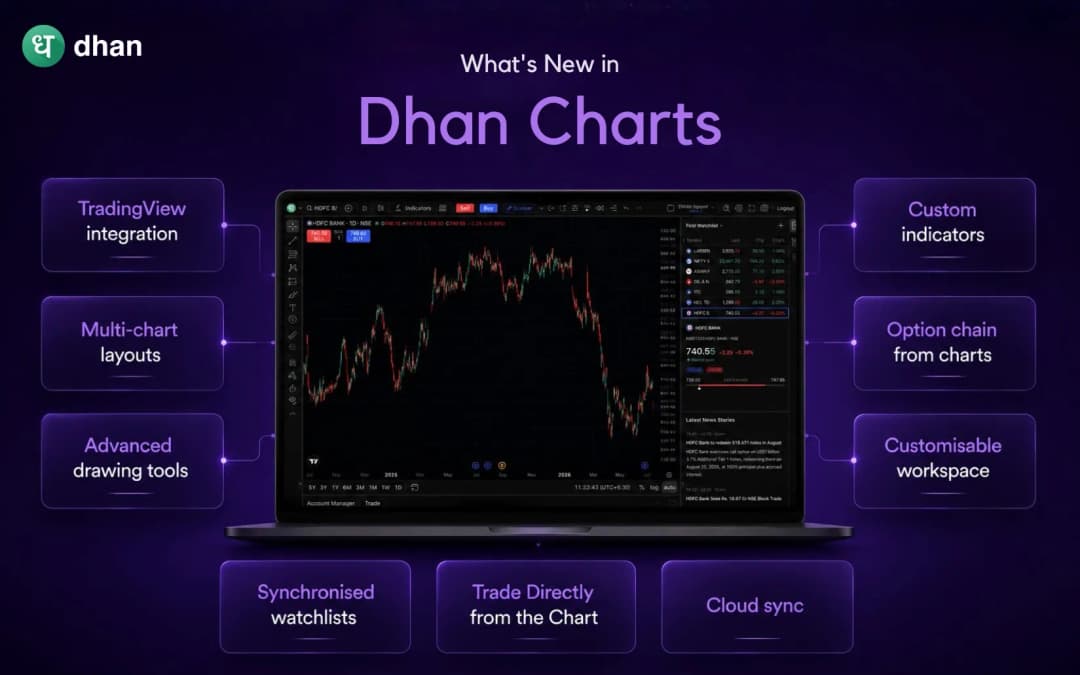
TradingView integration
Dhan Charts offers an integration with TradingView, industry-leading charting software, giving you access to ultra-smooth rendering, a wide range of drawing tools, and a vast library of indicators. This allows you to access premium charting features without having to subscribe to a separate charting service.
Multi-chart layouts
Dhan Charts offers multi-chart layouts that let you view up to 8 charts at once in vertical or grid format. It enables you to track index futures, spot calls and puts, and your watchlist stocks, all in one screen.
Advanced drawing tools
Dhan Charts offers a comprehensive suite of drawing tools, including Anchored VWAP with Bands. Thus, you can plot AVWAP from any anchor point and track it as price evolves.
Custom indicators
Dhan's indicator library offers access to 100+ TradingView indicators, along with 40+ custom-built indicators such as Dhan HalfTrend, ORB, Darvas Box, AutoFib, and more. Additionally, you can also save your favourite indicators and drawings for future access, which will save you time during busy market hours.
Option chain from charts
On any options chart, you can access the full Option Chain across segments, review liquidity and depth, and place buy or sell orders from within the same view on Dhan Charts without leaving the chart interface.
Customisable workspace
You can customise, save and restore your chart layouts, indicator favourites and display preferences (light and dark mode) automatically across sessions on Dhan Charts.
Synchronised watchlists
Dhan Charts integrates the order window and market depth into a single pane and updates your watchlist in real time. This allows you to analyse price action, track and execute trades without switching tabs within the same interface.
Trade Directly from the Chart
On Dhan Charts, you can place buy/sell orders in just one click, and set stop loss and target levels directly on the chart. Furthermore, it also allows you to use conditional orders and set alerts for automated trading, thus decreasing your reaction time and manual errors.
Cloud sync
Your setups, drawings, and layouts are automatically saved to the cloud. Whether you switch devices or restart your terminal, your workspace is always ready to go with no need to rebuild your charts every day.
How Dhan Charts improve your daily workflow
For traders who spend hours on charts, small inefficiencies compound. The new Dhan Charts address those pain points in the following ways:
- Speed: Faster rendering, quick search and pre-loaded templates reduce setup time.
- Flexibility: Multi-layout options and custom workspaces allow you to customise charts to suit your trading style, whether you're a scalper, swing trader, or positional trader.
- Clarity: Synchronised watchlists, real-time OI/Greeks, and advanced indicators offer a clearer picture of market dynamics.
- Execution: One-click trading from charts bridges the gap between spotting a setup and acting on it.
Wrap up
If you're a trader who spends significant time analysing markets, your charting platform should be an extension of your thought process, not a bottleneck. The new Dhan Charts are built with this same philosophy in mind to make technical analysis quick, flexible and integrated with execution.
Every feature on Dhan Charts is built to improve your daily workflow. Dhan Charts not only offers an upgrade but also a productivity multiplier that helps you trade smarter, not harder.