


Dhan Scalper vs Other Brokers: Full comparison for active traders





Key takeaways:
- Developed on Dhan's proprietary DEXT engine, which processes 90% of orders in under 20 milliseconds, Dhan Scalper interfaces deliver faster execution.
- Dhan Scalper provides a single-screen interface that integrates index spot charts, Call/Put option charts, live option chains, position management, and order books, eliminating the need to switch screens.
- It allows scalpers to enter and exit the market instantly with floating order windows on charts or 40+ customisable keyboard shortcuts.
- It provides Full Market Depth directly in chart and order windows to identify the liquidity pockets before entering.
- Dhan offers real-time P&L tracking and chart-based stop-loss adjustments for robust risk management.
The majority of brokerage platforms in India are general-purpose platforms built to cater for a broad range of market participants. This one-size-fits-all strategy works for passive investing, but it often leads to execution bottlenecks for active intraday traders. Scalping is not swing trading or investing. Scalping is a trading style that involves holding a position for seconds or minutes and profiting from small price movements over multiple trades.
When momentum breaks out in index options, navigating multiple tabs, confirming order pop-ups, or searching for strike prices can create execution friction. In a fast-moving market, this friction directly leads to slippage and lost profits. To eliminate these delays, Dhan built dedicated scalping interfaces, such as Scalper on Dhan Charts and Power Scalper on DEXT T3.
Let's take a look at how Dhan Scalper performs compared to other brokers' scalping workflows.
Dhan Scalper vs other brokers
Here is a detailed comparison between Dhan Scalper and other brokers:
Execution experience, speed & latency
Most traditional platforms use generic API routing for traffic management. In times of high market volatility (such as market opening bell or RBI policy announcements), they may experience higher latency, leading to delays in order placement and status updates.
In contrast, Dhan Scalper runs on DEXT, Dhan's dedicated, low-latency trade processing architecture. DEXT routes trades directly through optimised execution pathways, and processes 90% of all orders in less than 20 milliseconds, which rapidly sends trades to the exchange matching engine.
Order placement speed & one-click actions
With other brokers, placing an order often involves opening a secondary window, which adds latency to trade execution. Additionally, traders have to choose order types (Market/Limit) and lot sizes, then click to submit the order.
Dhan Scalper has a floating order window directly on the charts. It allows traders to place trades with a single click or tap at the available price, without any pop-up confirmations interrupting chart analysis.
Keyboard shortcuts
Many platforms still rely heavily on mouse-driven navigation. To modify orders, switch strikes or close positions, traders have to use a cursor to move across different panels.
The Dhan Scalper supports more than 40+ keyboard shortcuts on its desktop terminal. Thus enabling active traders to buy/sell, cancel pending orders, modify limit prices, and close positions directly from the keyboard without taking their hands off the keys.
Live market depth & order book visibility
Market depth is usually hidden in a separate context menu or floating widget on other brokers, which means traders must choose between price action and order book liquidity, as they can't view them together.
On Dhan Scalper, live Market Depth and VWAP reference trails are embedded directly into order windows and chart screens. Traders on DEXT T3 can access Full Market Depth (up to 200 bid/ask levels) to see liquidity concentrations and order walls before executing their trades.
Position management & fast exits
To exit a trade or adjust a stop-loss, scalpers have to navigate away from their chart to a dedicated positions or portfolio tab, select the open contract, and submit an exit order on order brokers, which often breaks their trading workflow and adds a few seconds to their trade placement.
On Dhan Scalper, positions are updated in real time directly on the chart interface. Traders can drag-and-drop stop-loss or target levels directly on the chart and quickly square off open positions without leaving their trading workspace, enabling faster reactions during sudden market moves.
Customisable layouts & workspace usability
Most brokers have standard interfaces that offer a fixed, predetermined grid layout with limited ability to link charts, option chains, and position monitors, which doesn’t allow traders to customise their trading layout according to their trading needs.
Dhan’s DEXT T3 offers 30+ widgets that traders can customise according to their needs, enabling scalpers to create their own workspaces with the underlying index chart, At-The-Money (ATM) Call (CE) and Put (PE) option charts all on one screen, and with real-time strike updates as the spot price moves and also save them for future use.
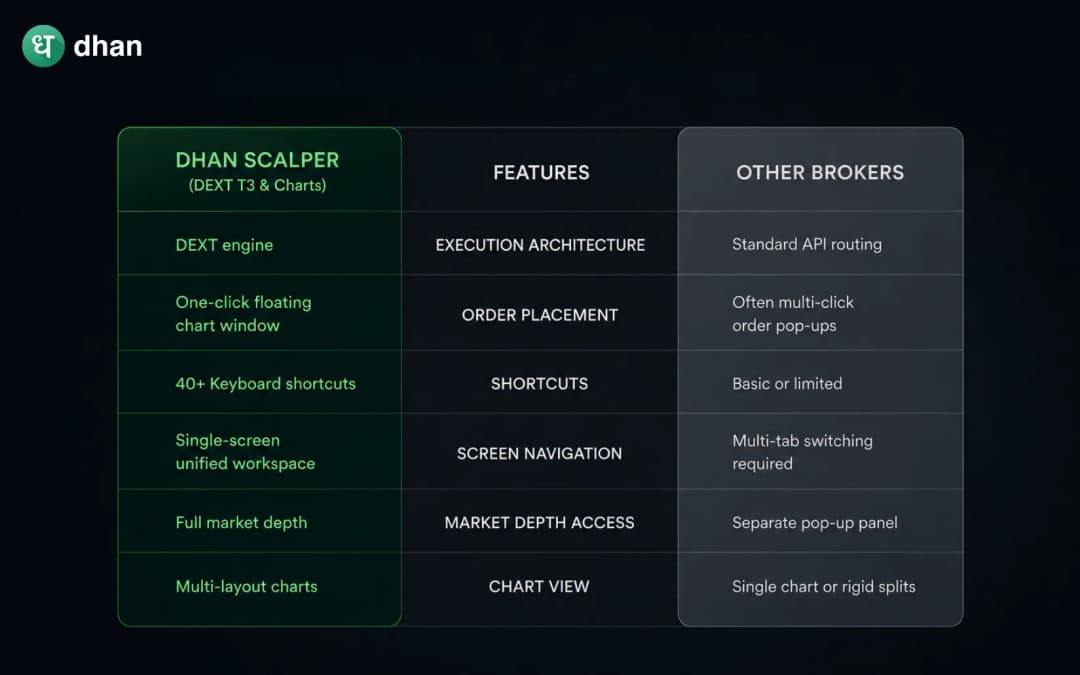
Features of Dhan Scalper vs other brokers
Let's do a quick comparison of the features of Dhan Scalper and other brokers:
Wrap up
In options scalping, the time taken between analysing a trade setup and executing it often determines a scalper's profitability. Traditional broker platforms introduce friction through multi-step order windows, fragmented screens, and mouse-heavy navigation, etc. By eliminating these structural delays, Dhan Scalper offers active intraday traders dedicated interfaces built specially for speed and clarity.
Whether traders are trading Nifty options via Scalper on Dhan Charts or managing complex multi-chart views on DEXT T3 Power Scalper, Dhan ensures that traders' focus stays where it belongs, i.e on price action, speed, and execution accuracy, not on their platform's weakness.