


Why trade Intraday with Claude? Try Dhan MCP & Skills!







Key takeaways:
- Using Claude as a general chatbot during live markets means working from manually typed, delayed information with no access to your portfolio, live data, or order management. Dhan MCP and Skills close that gap.
- Dhan MCP is an MCP server that connects your live Dhan account to any MCP-compatible client like Claude Desktop, Cursor, VS Code, or any MCP SDK.
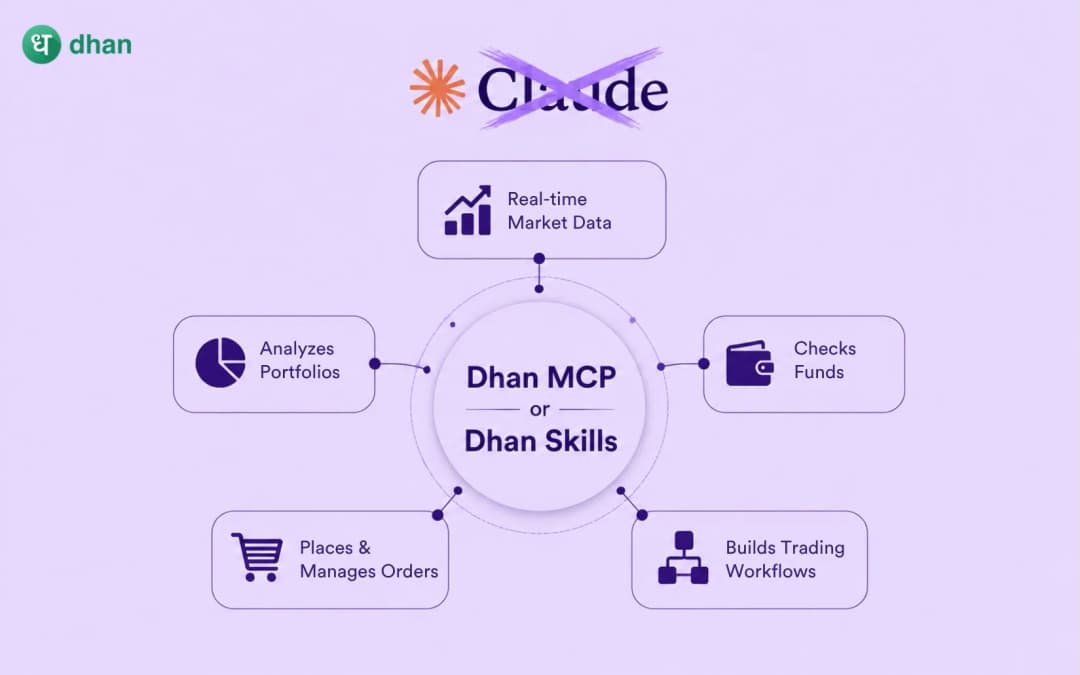
- Dhan MCP can fetch live quotes, market depth, and option chains with Greeks; check holdings, positions, and fund balance; calculate margins; place, modify, and cancel orders all through conversational AI with explicit per-session consent.
- Dhan Skills is an open SKILL.md file containing 12 API categories to provide structured knowledge of Dhan's APIs to AI coding agents (Claude Code, Codex) for accurate, production-ready trading automation code without manual API documentation study.
- Dhan MCP allows conversational AI to interact with your account in real time. In contrast, Dhan Skills enables AI coding agents to build trading automations in code.
Most traders who have experimented with AI during market hours have done so the same way by opening a chat window, describing what they are seeing, pasting in some numbers, and asking for analysis. With this info, the AI agent then assists traders by only explaining an options strategy, walking them through an indicator reading, or helping structure a trading plan.
But there is a ceiling to what AI can do when it is working only from information you type into it. It does not know what your portfolio holds right now. It cannot see your available margin. It has no access to live market data. And it cannot place, modify, or cancel an order on your behalf. For intraday trading, where the gap between analysis and execution is measured in seconds, not minutes, using a standalone AI chatbot offers only limited operations.
To make AI tools more useful, Dhan built Dhan MCP and Dhan Skills, which are two distinct integrations that connect AI directly to your live Dhan trading account, closing the gap between asking and acting. Let’s explore them in detail in this post.
Why does standalone AI fall short for Intraday Trading?
The problem with using Claude as a general chatbot during live market hours is structural, not a limitation of the AI's intelligence. Regardless of how well Claude knows options pricing or intraday momentum, it is always dealing with a few-seconds-delayed data. That delay is no small matter in a fast-moving market. It often results in the difference between catching a move and missing it.
A second limitation is fragmentation. Using AI for analysis and a separate platform for execution means constantly switching contexts, i.e describing your setup to the AI, getting a view, switching back to the order window, re-entering the instrument and quantities, and placing the trade. Every step between a trading decision and its execution is a step where mistakes happen, and opportunities slip. Dhan MCP and Dhan Skills are Dhan's answer to both problems.
What is Dhan MCP?
Dhan MCP is a model context protocol (MCP) server that connects your live Dhan account directly to any MCP-compatible AI client. When you connect Dhan MCP to Claude Desktop, Cursor, VS Code, OpenCode, Kiro, or any other MCP-compatible client, your AI assistant is no longer working from information you describe to it. It has authenticated, real-time access to your actual Dhan account.
Dhan MCP is built for traders who want to interact with their account through natural language within an AI client environment. Through Dhan MCP, you can instruct Claude in natural language to:
- Fetch live market quotes, full market depth, and option chain data with Greeks.
- Check your current holdings, open positions, and fund balance.
- Calculate margin requirements for a proposed trade before placing it.
- Place market and limit orders, super orders with targets and stop losses, and after-market orders.
- Modify or cancel existing orders.
- Set alerts and monitor position status.
Every action runs through a per-session permission model with explicit consent, meaning you confirm what the AI acts on before it acts, which makes the AI a conversational interface to your trading account rather than a passive observer.
What is Dhan Skills?
DhanHQ Agent Skills is designed for a different type of user, like the developer or quant trader who builds trading automations using AI coding agents. Skills are open SKILL.md files that allow AI coding agents to load deep, structured knowledge about an external platform's API. The Dhan Skills pack covers 12 categories like orders, portfolio, market data, option chain, instruments, funds, live feed, error codes, common workflows, options analysis, backtesting, and ScanX.
When installed, an AI coding agent like Claude Code or OpenAI Codex gains the knowledge it needs to write accurate, production-ready code without the agent having to infer API structure from scattered documentation.
This allows a developer, instead of manually reading through API docs and writing code for order placement, to instruct an AI coding agent to do so. For example, a developer can ask it to write a script that places a limit order for 50 lots of Bank Nifty at the current ATM strike when VWAP crosses above the 5-minute EMA and the agent, loaded with Dhan Skills, will produce accurate, executable code that maps to Dhan's actual API structure.
Dhan Skills also come with built-in safety guardrails. Order confirmation is required before every place, modify, or cancel action. All orders default to limit rather than market. F&O lot size validation runs automatically. Thus, the agent is built to be a knowledgeable assistant, not an autonomous trader that acts without your approval.
The distinction that matters?
Dhan MCP and Dhan Skills serve different needs but share the same underlying goal of making AI a direct participant in the trading workflow rather than a bystander. Dhan MCP is for conversational interaction. If you want to ask "what is my current margin utilisation?" or say "place a buy order for 25 lots of Nifty at 24,200" and have it happen through Claude Desktop or another compatible client, Dhan MCP is the integration for that.
Dhan Skills is for programmatic automation. If you are building a strategy, writing a trading bot, or automating a workflow and you want an AI coding agent to help you write and refine that code against Dhan's APIs, Dhan Skills is the integration for that.
Wrap up
Trading with AI does not mean having a smarter chatbot in another tab. It means giving your AI assistant the access, context, and tools it needs to be genuinely useful inside your trading workflow, not outside it. Dhan MCP and Dhan Skills represent two distinct but complementary ways to make that possible.
Whether you trade through natural language conversation or build automation in code, Dhan has built this infrastructure to connect AI directly to the capabilities of your live account. The gap between analysis and execution where most intraday traders lose both time and edge narrows considerably when the AI working alongside you has access to the same information and tools that you do.