


 Nifty 50
 Sensex
 US Tech 100
 Dow Jones
 FTSE
 Dax
 CAC
 Nikkei 225
 Hang Seng
 SSE Composite
 TAIEX
 KOSPI
 Gift Nifty
 Strategy Indices
 Broad Market Indices
 Sectoral Indices
 Thematic Indices


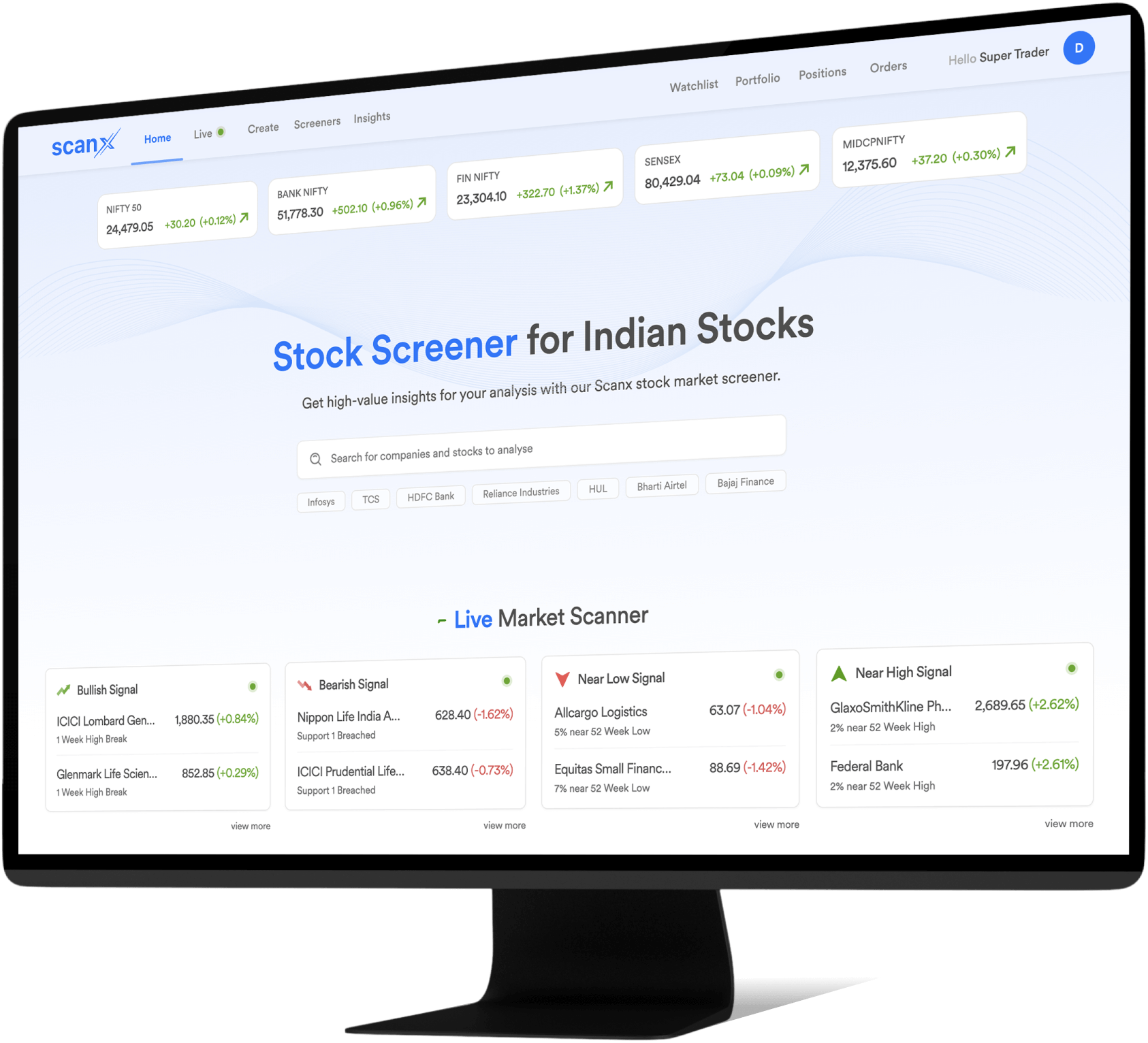


The Complete Stock Screening Experience
The Complete
Stock Screening Experience

50+ Readymade Screeners
Spot the right stocks easily using Fundamental, Intraday, Technical screeners and more for your research.

200+ Custom Filters
Quickly sift through stocks with razor-sharp efficiency based on your approach and market bias.

Sectoral Research
Analyze sectors with much more depth and clarity using PE, PB, EBITDA Margin, and other screeners.

Advanced Screening Mode
Compare the finer details of stocks with advanced operators and parameters for better tracking and insights.

Stock Insights
A holistic view of all things that matter for every stock, right from the fundamentals to its technicals and financials, available on one screen.

FII & DII Updates
Check the buying and selling activity of FIIs and DIIs for daily, weekly, or monthly timeframes!

1-Tap Trade Execution
Reliable order execution for all your trades so that you can buy and sell with confidence while screening and scanning the market in depth!

Create & Share Screens
Build your own stock screeners on ScanX. Save each custom screener and share them with fellow traders!


Readymade Stock Screeners For Deeper Insights
Readymade Stock Screeners
For Deeper Insights


Fundamental Screeners
For traders and investors who want to look at cold hard facts about a company’s financial health. Screen stocks based on EPS, P/E, Working Capital, and more for better stock picking.

Technical Screeners
Built to help you capture stocks when they trend towards specific price points and zones. Ideal for traders who want their screener to identify Crossovers, Breakouts, and more.
Intraday Screeners
Move quickly between 9:15 to 3:30 with day trading screeners on ScanX. Choose from criteria such as High Volume Stocks, Intraday Recovery, Intraday SuperTrend, and more.

Price & Volume Screeners
Uncover stocks with rising or falling trends based on their price and volume, including special ones that have Unusually High Volume or Circuit breakers!

Candlestick Screener
If you like to use candlestick patterns for identifying stocks, you will love the Candlestick Screener on ScanX! It has Three White Soldiers, Dark Cloud Cover, Three Black Crows, and many more awesome patterns!

Your Custom Screeners
ScanX gives you the complete freedom to build your screeners from scratch. You can build screeners for multiple industries using multiple filters that span across revenue, indicators, patterns, and much more!
Fundamental Screeners
For traders and investors who want to look at cold hard facts about a company’s financial health. Screen stocks based on EPS, P/E, Working Capital, and more for better stock picking.
Technical Screeners
Built to help you capture stocks when they trend towards specific price points and zones. Ideal for traders who want their screener to identify Crossovers, Breakouts, and more.
Intraday Screeners
Move quickly between 9:15 to 3:30 with day trading screeners on ScanX. Choose from criteria such as High Volume Stocks, Intraday Recovery, Intraday SuperTrend, and more.
Price & Volume Screeners
Uncover stocks with rising or falling trends based on their price and volume, including special ones that have Unusually High Volume or Circuit breakers!
Candlestick Screener
If you like to use candlestick patterns for identifying stocks, you will love the Candlestick Screener on ScanX! It has Three White Soldiers, Dark Cloud Cover, Three Black Crows, and many more awesome patterns!
Your Custom Screeners
ScanX gives you the complete freedom to build your screeners from scratch. You can build screeners for multiple industries using multiple filters that span across revenue, indicators, patterns, and much more!

Market Insights for Better Analysis
Market Insights
for Better Analysis

Stock Heatmap
Zoom out and get the complete picture of the market with ScanX Heatmaps! Discover the performance of every stock in an index, bundled together on one screen. View by market cap or as grid!

FII DII Insights
Check the amount of money invested or pulled from the markets by Foreign Institutional Investors (FIIs) and Domestic Institutional Investors (DIIs). This reveals the true strength of the markets.

Market Valuation
Plan your strategies by evaluating the fundamentals of the market. Check whether the market is overbought, oversold, or just right with metrics such as PE Ratio, PB Ratio, and Dividend Yield.

Bulk Deals
Monitors deals that involve trade of 0.5% or more of a company’s shares in a single session, potentially affecting stock prices.

Block Deals
Monitor trades worth more than 5 crore executed through special trading window between the institutions.

FnO Ban Insights
View the complete list of stocks whose futures and options are banned.


Stock Heatmap
Zoom out and get the complete picture of the market with ScanX Heatmaps! Discover the performance of every stock in an index, bundled together on one screen. View by market cap or as grid!
FII DII
Check the amount of money invested or pulled from the markets by Foreign Institutional Investors (FIIs) and Domestic Institutional Investors (DIIs). This reveals the true strength of the markets.
Market Valuation
Plan your strategies by evaluating the fundamentals of the market. Check whether the market is overbought, oversold, or just right with metrics such as PE Ratio, PB Ratio, and Dividend Yield.
Bulk Deals
Monitors deals that involve trade of 0.5% or more of a company’s shares in a single session, potentially affecting stock prices.
Block Deals
Monitor trades worth more than 5 crore executed through special trading window between the institutions.
FnO Ban
View the complete list of stocks whose futures and options are banned.
Live Market Screener for Faster Discovery
Live Market Screener
for Faster Discovery


Bullish Signals
Helps you discover stocks hitting highs, crossing resistance levels, or breaking the upper circuit!

Bearish Signals
This screener on ScanX shows you which stocks are hitting lows, dropping below support levels, or breaking the lower circuit.

Nearing High
Every stock that is about to reach X% near its 52-week high will be visible to you on this screener!

Nearing Low
Keep tabs on stocks that are inching closer to their 52-week low by X% with this screener.

Rise & Fall
Track stocks that are rising from their lows or falling from their highs % by %.

Volume Signals
Stocks which display unusual or potential volume will be displayed with this screener.
Bullish Signals
Helps you discover stocks hitting highs, crossing resistance levels, or breaking the upper circuit!
Bearish Signals
This screener on ScanX shows you which stocks are hitting lows, dropping below support levels, or breaking the lower circuit.
Nearing High
Every stock that is about to reach X% near its 52-week high will be visible to you on this screener!
Nearing Low
Keep tabs on stocks that are inching closer to their 52-week low by X% with this screener.
Rise & Fall
Track stocks that are rising from their lows or falling from their highs % by %.
Volume Signals
Stocks which display unusual or potential volume will be displayed with this screener.
Trending Stock Screeners to Trade Efficiently
Trending Stock Screeners
to Trade Efficiently

Intraday Crossover
Complete list of stocks displaying a crossover for you to trade breakouts or breakdowns.

Intraday Supertrend
Identify stocks trending with momentum to capture day trading opportunities.

Intraday Rise & Fall
Track stocks with significant up or down price movements throughout the day.

Intraday Recovery
Spot stocks that are making a comeback after a dip for timely entry or exit.

Open High Stocks
Find stocks that opened at their highest price for you to capture potential entry/exit.

Open Low Stocks
Check stocks that opened at their lower price for you to capture potential entry/exit.


Intraday Crossover
Complete list of stocks displaying a crossover for you to trade breakouts or breakdowns.
Intraday Supertrend
Identify stocks trending with momentum to capture day trading opportunities.
Intraday Rise & Fall
Track stocks with significant up or down price movements throughout the day.
Intraday Recovery
Spot stocks that are making a comeback after a dip for timely entry or exit.
Open High Stocks
Find stocks that opened at their highest price for you to capture potential entry/exit.
Open Low Stocks
Check stocks that opened at their lower price for you to capture potential entry/exit.
Seamlessly Synced with
Dhan Ecosystem
- Positions
- Basket
- Watchlist
- Margin & Funds
- Orders
- Portfolio
- Tradebook
- Charts & Layouts
How to Use ScanX?
ScanX has 50+ readymade screeners, 200+ custom filters, and a range of industry-first market research tools. To help you use the ScanX Stock Screener at full potential we have created a complete walkthrough video for you all!
Love from India's Traders & Investors
Love from India's
Traders & Investors


Ipsita Sahoo
@ipsiworld
I am loving Dhan app so far.
@DhanHQ @DhanCares Thanks for providing an amazing platform specially for traders.
#OptionsTrading #TRADINGTIPS

chirag_p
@chirag_721p
@dhanhq good broker and good tech support with best chart experience. #madefortrade with tradingview chart with no glitch in price movement

Shashank Singh
@knahsahs_hgnis
No matter what, but i will be the strongest cheerleader for @DhanHQ , hope to see you guys as the industry leader in coming 5 years, All the best, @BeingPractical u have literally inspired me a lot, cheers.


Novice Trader
@NoviceT7
I started using Dhan trading platform and I would say this is one of the best platform for the trader providing seamless UI @DhanHQ

Trading eye
@Priyabrata099
Dhan's platform is best in India.

TUKKEBAAZ TRADER
@tukkebaaztrader
Really best broker
I tried and traded in many brokers
But your platform is too good for trading

Gaurav (blue tick here)
@simplyGAURAV007
I got access to options app of @DhanHQ . Blown away by the ease of placing trade and brokerage calculation.For someone who ends up placing more than 20 intraday orders on an avg this thing is insanely powerful and cost effective. Wow!In love with the product. @BeingPractical 🔥🔥

Vivek Joshi
@mejoshivivek
You guys are dropping bombs on other discount brokers!🔥 Truly out of the box features!

Kshitiz Anand
@nuisancejunkie
Awesome job guys! @DhanHQ @DhanLive @DhanCares you listened! And did a wonderful job! Too good. Made my (and all the user's) day!

Chirag
@tweetsbychirag
Thanks for detail explanation and reaching out on behalf of me. You made me your lifetime customer. #CustomerService at its best.

Suneel.A
@a_suneel
@DhanHQ Undoubtedly the best trading platform I have used ! Love the UI and the ease of use.

Annamayya ks
@ksannamayya
@DhanHQ- excellent interphase and features for traders, just go through their features. U will not need any other broker. Amazon level customer service.


Aakash Kamdi
@johndoedeigner
There is a new player in the financial market -@RaiseTheBarHQ entering with its own ecosystem with scratch. The very first product is @DhanHQ awaiting early access & also can't wait to see other Products.

Ronak Bhagdev
@RonakBhagdev
@DhanHQ experience is super fast so far. Onboarding and applying for IPO were never that much easier. I am sure they must have some surprises coming in for long term investors like me.




Frequently Asked Questions
Questions on your mind? Dont worry we have the answers!
A stock screener filters stocks based on specific criteria such as Volume, Highs, Lows, and others to help you identify potential trading and investing opportunities.
You’ll be able to track a lot more stocks by using ScanX Stock Screener because it helps you identify a variety of shares based on your criteria. Plus, it helps you save time!
Yes, stock screeners can help identify good stocks by applying filters based on financial and technical factors/metrics.
- You can create your custom screeners
- You can share these custom screeners
- You can trade where you screen
There are plenty more reasons for you to use ScanX! Explore them by opening your a/c now.
- Open ScanX
- Click on “Create”
- Choose from a host of Filters
- Tap on Save
That's how simple it is!




